To open a mail message from a textbox you can use the following URL in the action box of the text.
mailto:user@gmail.com?subject=This%20is%20an%20email%20test
To open a webpage in a new page
="javascript:void(window.open('"+ "http://www.bbc.co.uk" + "','_blank'))"
In the report viewer there is no back button which will take tyou back to your original report. What you can do is create your own textbox which you use the action function to take you back to the main report. This refreshes the original report, you can use the following URL and this will take you back to the main report whithout refereshing it.
javascript:history.back(1)
Friday, 28 October 2011


Thursday, 29 September 2011
T sql Scripts
Here are some scripts which I use now and then, it is quite useful to have these handy.
--- percentage Calculation returns zero
select (43/50) * 100
---percentage calculation where you cast the values
select cast(43 as float)/cast(50 as float)*100
---percentage calculation
---with 2 decimal places
select convert(decimal(10,2),cast(43 as float)/cast(50 as float)*100)
---Date Scripts
select datepart(d,getdate()) --returns day number
select datepart(dw,getdate()) --returns day of week, day 1 = Sunday and 7 = Saturday
select datename(month,GETDATE()) --retunrs Month Name
select left(datename(month,GETDATE()),3) --returns first 3 letters of Month Name
select datename(WEEKDAY,GETDATE()) --returns Day Name
select left(datename(WEEKDAY,GETDATE()),3) --returns first 3 letters of Day Name
--- percentage Calculation returns zero
select (43/50) * 100
---percentage calculation where you cast the values
select cast(43 as float)/cast(50 as float)*100
---percentage calculation
---with 2 decimal places
select convert(decimal(10,2),cast(43 as float)/cast(50 as float)*100)
---Date Scripts
select datepart(d,getdate()) --returns day number
select datepart(dw,getdate()) --returns day of week, day 1 = Sunday and 7 = Saturday
select datename(month,GETDATE()) --retunrs Month Name
select left(datename(month,GETDATE()),3) --returns first 3 letters of Month Name
select datename(WEEKDAY,GETDATE()) --returns Day Name
select left(datename(WEEKDAY,GETDATE()),3) --returns first 3 letters of Day Name
Alternate Colors in a Matrix/Pivot Table
To add alternate colors in a matrix the expression should be as follows for the row group:
=IIf( RunningValue (Fields!FIELDNAME.Value, CountDistinct, Nothing) MOD 2, "Transparent", "aliceblue")
The tricky bit is when you want the same shading for the column groups. The way to do this is to insert a column outside of the row group and then use the same expression. Change the name of the textbox to "color". Then in your column group or data field in your matrix in the background color insert the expression which refers to the textbox "color":
=Reportitems!color.value
The colors in the matrix will alternate like a normal table.
Wahayy!!
Also in a anormal table where you have multiple groups you can use the following script for say 2 groups I assume you just use '&' and add in the extra fields if you have more than one group:
=IIF(RunningValue(Fields!Field1.Value & Fields!Field2.Value,CountDistinct, Nothing) MOD 2 = 1, "White", "Aliceblue")
=IIf( RunningValue (Fields!FIELDNAME.Value, CountDistinct, Nothing) MOD 2, "Transparent", "aliceblue")
The tricky bit is when you want the same shading for the column groups. The way to do this is to insert a column outside of the row group and then use the same expression. Change the name of the textbox to "color". Then in your column group or data field in your matrix in the background color insert the expression which refers to the textbox "color":
=Reportitems!color.value
The colors in the matrix will alternate like a normal table.
Wahayy!!
Also in a anormal table where you have multiple groups you can use the following script for say 2 groups I assume you just use '&' and add in the extra fields if you have more than one group:
=IIF(RunningValue(Fields!Field1.Value & Fields!Field2.Value,CountDistinct, Nothing) MOD 2 = 1, "White", "Aliceblue")
Wednesday, 15 June 2011
Expressions - Following Monday
=DateAdd("d",(8-Weekday(today(),0)),today())
The above expression will return the following Monday from Todays Date.
The above expression will return the following Monday from Todays Date.
Tuesday, 26 October 2010
Exporting to Excel and renaming sheets in 2008 R2
In Reporting Services 2008 R2 Microsoft has added functionality to rename multiple sheets, so if your report is more than one page and you want to rename the worksheets this will work automatically out of the box.
You can either rename the sheets for a group, if each group has a page break between them or you can rename sheets if there is page break between objects.
To rename sheets in a table with groups all you have to do is select the group as shown below and then in the properties window (press F4 if the properties window is not shown) change the setting for pagename under the Group section to the value you want. This could be text or a field from your dataset.

The export to excel will rename the sheets with the group name.

You can either rename the sheets for a group, if each group has a page break between them or you can rename sheets if there is page break between objects.
To rename sheets in a table with groups all you have to do is select the group as shown below and then in the properties window (press F4 if the properties window is not shown) change the setting for pagename under the Group section to the value you want. This could be text or a field from your dataset.

The export to excel will rename the sheets with the group name.
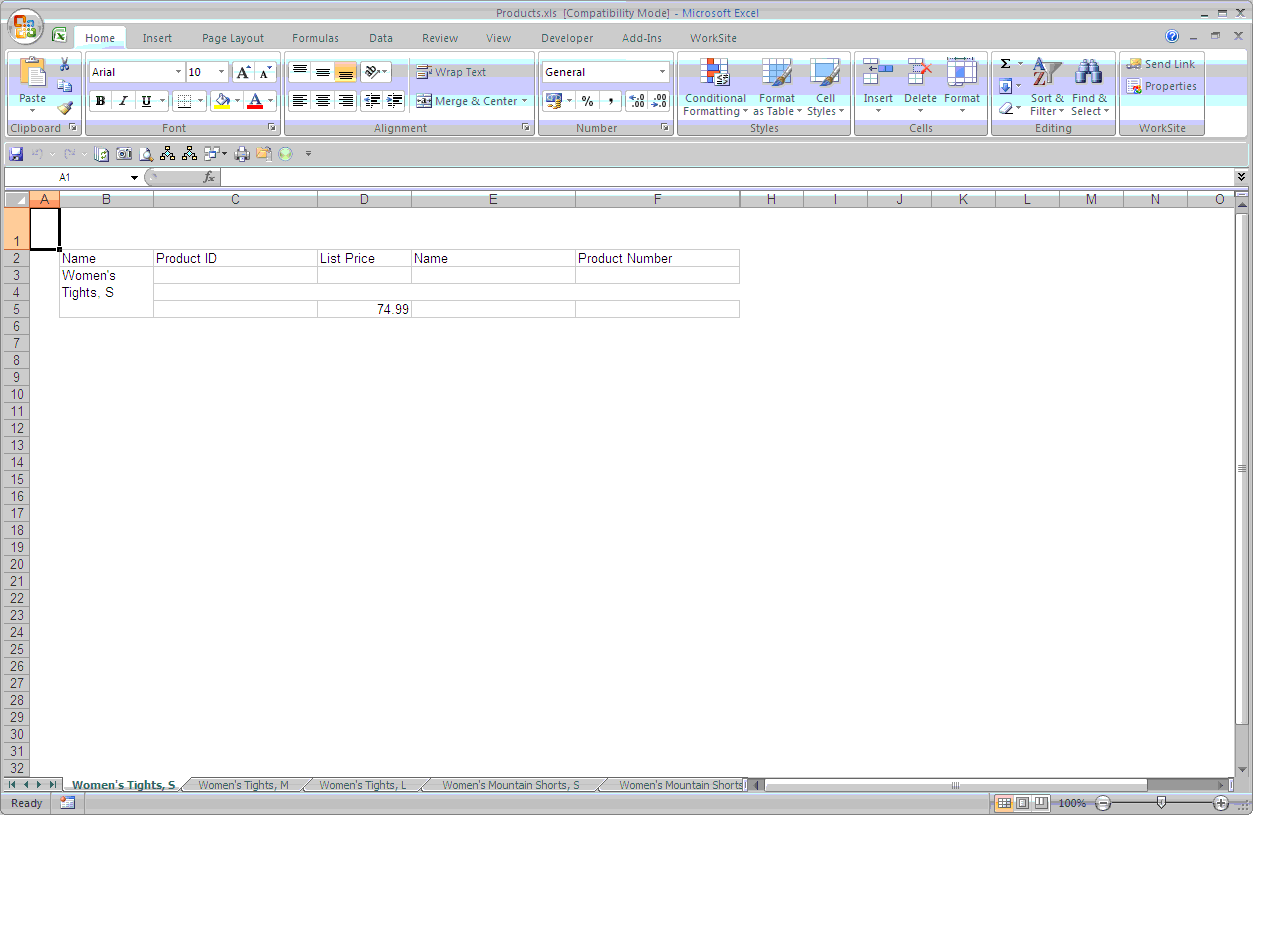
Exporting to Excel and renaming sheets in 2005
In Reporting Services 2005 there was no functionality to rename sheets when your report was more than one page. You had to either use custom code to rename the sheets or use a macro.
We created a field in one of the cells in the report and then changed the font colour to white, then we created a macro to copy the value in the cell and rename the sheets. The macro is shown below:
Sub RenameSheets()
' Renames all the sheets based on the contents of the cell A1
' If the cell A1 is empty the sheet will be renamed and there is a limit of 31 characters if this is exceeded then only the first 31 are used
' If the following characters are used then an error will be returned:
' []?*/\:
Dim i As Integer
For i = 1 To Sheets.Count
If (Len(Worksheets(i).Range("A2").Value) < 32) Then
If (Len(Worksheets(i).Range("A2").Value) > 0) Then
Sheets(i).Name = Worksheets(i).Range("A2").Value
End If
Else
Sheets(i).Name = Left(Worksheets(i).Range("A2").Value, 31)
End If
Next
End Sub
We created a field in one of the cells in the report and then changed the font colour to white, then we created a macro to copy the value in the cell and rename the sheets. The macro is shown below:
Sub RenameSheets()
' Renames all the sheets based on the contents of the cell A1
' If the cell A1 is empty the sheet will be renamed and there is a limit of 31 characters if this is exceeded then only the first 31 are used
' If the following characters are used then an error will be returned:
' []?*/\:
Dim i As Integer
For i = 1 To Sheets.Count
If (Len(Worksheets(i).Range("A2").Value) < 32) Then
If (Len(Worksheets(i).Range("A2").Value) > 0) Then
Sheets(i).Name = Worksheets(i).Range("A2").Value
End If
Else
Sheets(i).Name = Left(Worksheets(i).Range("A2").Value, 31)
End If
Next
End Sub
Monday, 25 October 2010
New Line in a Text Box
In a text box field you can use the following code to force reporting services to start a next line.
'This the first line'+ VBCRLF +
'This is the second line'+ VBCRLF +
'This is the third'
'This the first line'+ VBCRLF +
'This is the second line'+ VBCRLF +
'This is the third'
Subscribe to:
Posts (Atom)