When running a report for the first time in report manager it takes a while to run, after this initial run reports run fine.
There are a number of ways to keep reporting services awake so that when you run a report it runs straight away and is not slow to load.
I have found a number of scripts on the web but I could not get them to work, so I created my own and tweaked it and it works! :-)
The idea is to run a report using PowerShell with a URL and then create a job which will run the job before your users start running reports.
The PowerShell script below runs a report
$IE=new-object -com internetexplorer.application
$IE.navigate2("ENTERREPORTURLLINKHERE")
$IE.visible=$true
Test the script in PowerShell on your server and then save the file.
Then create a SQL Agent job which you then schedule to run every day at say 6am.
This works on SSRS 2016 I have not tested on previous versions but it should work in principle
Wednesday, 3 January 2018


Monday, 22 July 2013
Extracting Users from Windows Groups on Report Server
There may be occasions when using
windows active security is not ideal so you may need to create and maintain
your own windows groups for security on reports. One of the downfalls is to be
able to extract a list of the windows groups you have on the server and
presenting it to management. It is quite frustrating to be asked about who the
users are for which groups and the recipients for report subscriptions.
To
get round this issue I wrote some script to extract the groups and users from a
windows server, once extracted a report can be easily extracted so you can see
who has access.
I
have used an SSIS package to do this:
The
package runs a SP on the master database on the SSRS server and then
inserts the data to another server which is used for reporting. The reason for
creating a package was due to not being able to insert the data to another
database on a different server.
----------------------------------------------------
--SP
extracts the groups and users
----------------------------------------------------
proc
[dbo].[my_sp_servergroups]
as
---------------------------------------------windows
groups
if
object_id ('my_tbl_groups') is not null
drop
table my_tbl_groups
if
object_id ('my_tbl_groups1') is not null
drop
table my_tbl_groups1
create
table my_tbl_groups (groupname varchar(100))
create
table my_tbl_groups1 (groupname varchar(100),group_name varchar(100), RowNumber
int)
insert
into my_tbl_groups
exec
xp_cmdshell 'net localgroup'
delete
from my_tbl_groups where left(isnull(rtrim(groupname),'MpTI'),4)
<> '*ssr'
insert
into my_tbl_groups1
select
*,right(rtrim(groupname),len(rtrim(groupname))-1) as group_name,
(select
count(*) from my_tbl_groups as b where b.groupname <= a.groupname)
AS RowNumber
from
my_tbl_groups a
--select
* from my_tbl_groups1
-------------------------------------------------
------------------------------group
members
if
object_id ('my_tbl_groupsmembers') is not null
drop
table my_tbl_groupsmembers
create
table my_tbl_groupsmembers (members char(200))
if
object_id ('my_tbl_servergroups') is not null
drop
table my_tbl_servergroups
create
table my_tbl_servergroups (members char(200), group_name char(200))
DECLARE
@number_of_groups INT set @number_of_groups = (select count(
distinct groupname) from my_tbl_groups1 )
DECLARE
@counter int set @counter= 1
declare
@text char(200)
truncate
table my_tbl_servergroups
truncate
table my_tbl_groupsmembers
WHILE
@counter <= @number_of_groups
BEGIN
set @text = (select 'net localgroup
'+group_name from my_tbl_groups1 where rownumber = @counter )
insert into my_tbl_groupsmembers exec
xp_cmdshell @text
insert into my_tbl_servergroups
select *, (select group_name from my_tbl_groups1
where rownumber = @counter) as group_name from my_tbl_groupsmembers
truncate table my_tbl_groupsmembers
SET @counter = @counter + 1
END
delete
my_tbl_servergroups where left(isnull(members,'Empty'),6)<> ''
----------------------------
--The
script below copies the data to another server
----------------------------
if
object_id ('my_tbl_servergroups') is not null
drop
table dbo.my_tbl_servergroups
create
table my_tbl_servergroups (members char(200), group_name char(200))
insert
into my_tbl_servergroups
select
* from [SERVERNAME].[master].[dbo].my_tbl_servergroups
Tuesday, 13 November 2012
T SQL Concatenated Row Field
When creating new reports you sometimes need to concatenate data:
Below is sample script which will allow you to do this using a function.
----------------------------------------------------------------------------
------ create table
----------------------------------------------------------------------------
with cte as (select 123 as customer, '2012-09-18 00:00:00.000' as orderdate
union all
select 123 as customer, '2012-09-19 00:00:00.000' as orderdate
union all
select 123 as customer, '2012-09-20 00:00:00.000' as orderdate
union all
select 124 as customer, '2012-09-21 00:00:00.000' as orderdate
union all
select 124 as customer, '2012-09-22 00:00:00.000' as orderdate
)
select * into CustomerOrder from cte
----------------------------------------------------------------------------
------ create function to concatenate dates
----------------------------------------------------------------------------
create function [dbo].[GetCustomerOrderDates](
@customer varchar(20)
)
returns varchar (8000)
as
begin
declare @str varchar (8000)
set @str = ''
if @customer is null
return ''
select @str = @str + cast(dayz as varchar(300))+': ' FROM
(select top 1000 customer, orderdate, convert(char(2),datepart(d,orderdate))+' '
+CONVERT(char(3),DATENAME(mm,orderdate)) as
dayz
from CustomerOrder
where customer =@customer
order by orderdate
) as derived
if (len (@str) > 1)
set @str = left(@str, len(@str) - 1)
return (@str)
End
----------------------------------------------------------------------------
------ run query and use function to return concatenated dates
----------------------------------------------------------------------------
select distinct customer, dbo.[GetCustomerOrderDates](123) as orderdates
from CustomerOrder
Below is sample script which will allow you to do this using a function.
----------------------------------------------------------------------------
------ create table
----------------------------------------------------------------------------
with cte as (select 123 as customer, '2012-09-18 00:00:00.000' as orderdate
union all
select 123 as customer, '2012-09-19 00:00:00.000' as orderdate
union all
select 123 as customer, '2012-09-20 00:00:00.000' as orderdate
union all
select 124 as customer, '2012-09-21 00:00:00.000' as orderdate
union all
select 124 as customer, '2012-09-22 00:00:00.000' as orderdate
)
select * into CustomerOrder from cte
----------------------------------------------------------------------------
------ create function to concatenate dates
----------------------------------------------------------------------------
create function [dbo].[GetCustomerOrderDates](
@customer varchar(20)
)
returns varchar (8000)
as
begin
declare @str varchar (8000)
set @str = ''
if @customer is null
return ''
select @str = @str + cast(dayz as varchar(300))+': ' FROM
(select top 1000 customer, orderdate, convert(char(2),datepart(d,orderdate))+' '
+CONVERT(char(3),DATENAME(mm,orderdate)) as
dayz
from CustomerOrder
where customer =@customer
order by orderdate
) as derived
if (len (@str) > 1)
set @str = left(@str, len(@str) - 1)
return (@str)
End
----------------------------------------------------------------------------
------ run query and use function to return concatenated dates
----------------------------------------------------------------------------
select distinct customer, dbo.[GetCustomerOrderDates](123) as orderdates
from CustomerOrder
Thursday, 8 November 2012
Create a data driven subscription for the last working day
The standard scheduling reporting services 2008 r2 does not include the last day of the month.
A workaround is to use sql code in a data driven subscription to create this schedule.
The code is shown below:
I have used a function to strip out the time ...
CREATE FUNCTION wfDateWithoutTime
(@datewithtime DATETIME)
RETURNS SMALLDATETIME
AS
BEGIN
DECLARE @datestring AS VARCHAR(20)
SET @datestring = CONVERT(VARCHAR(20),@datewithtime,101)
RETURN CONVERT(SMALLDATETIME, @datestring)
END
The t sql code is then used in the sql query of the data driven subscription as follows:
with cte as
(select DATEADD(m, DATEDIFF(m, 0, GETDATE())+1, 0) -1 as tday)
select * from cte where tday = (select dbo.wfdatewithouttime(getdate()))
You then need to set the data driven subscription to run on a daily basis. The subscription will then only run on the last day of the month.
Tuesday, 23 October 2012
Thursday, 16 August 2012
Conditional Page Breaks in SSRS 2008 r2
I have recently been looking at conditional page breaks in SSRS 2008 r2 and did not know that it is possible to do via an expression.
For example if you have say 2 tables in a report and you want to conditionally force a page break between the 2 so that they appear separately on 2 pages based on a parameter.
This is possible, to do this first select the first table and then in the properties of the table under 'General' and then 'Pagebreak' change the break location to 'end'. This will then force a page break at the end of the table one.
To make the pagebreak conditional create a parameter called pagebreak with the available values of 'yes' and 'no'. Then in the properties for the table under the break location there is a field called 'Disabled' click on the dop down and select the expression option, in the expression box type the expression as:
=iif(Parameters!pagebreak.Value="no",True,False)
When you run the report change the pagebreak parameter and you will see that this forces a page break when you select 'yes'.
Tuesday, 8 May 2012
SQL Server Failed jobs in SSMS
The following sql will list all the jobs that have failed in sql server:
SELECT TOP 100 PERCENT
Z.Originating_Server,
msdb.dbo.sysjobhistory.message as Error_Message,
len(msdb.dbo.sysjobhistory.message) as Error_Len
, msdb.dbo.sysjobs.name AS Job_Name
, msdb.dbo.sysjobhistory.step_id AS Step
, msdb.dbo.sysjobhistory.step_name AS Job_Step_Name
, (CASE
WHEN msdb.dbo.sysjobhistory.run_status = 0 THEN 'Failed'
WHEN msdb.dbo.sysjobhistory.run_status = 1 THEN 'Succeeded'
WHEN msdb.dbo.sysjobhistory.run_status = 2 THEN 'Retry'
WHEN msdb.dbo.sysjobhistory.run_status = 3 THEN 'Cancelled'
WHEN msdb.dbo.sysjobhistory.run_status = 4 THEN 'In progress'
END) AS Status
, cast(
cast(msdb.dbo.sysjobhistory.run_date as varchar) + ' ' +
left(right('000000' + cast(msdb.dbo.sysjobhistory.run_time as varchar), 6), 2) + ':' +
substring(right('000000' + cast(msdb.dbo.sysjobhistory.run_time as varchar), 6), 3, 2) + ':' +
right(right('000000' + cast(msdb.dbo.sysjobhistory.run_time as varchar), 6),2)
as smallDatetime) AS Date
, (SELECT DATENAME (dw, (select convert (smalldatetime, convert (varchar(10), msdb.dbo.sysjobhistory.run_date))))) AS [Day]
, (CASE
WHEN len(msdb.dbo.sysjobhistory.run_duration) = 6 THEN substring(cast(run_duration as char(6)),1,2)+':'+substring(cast(run_duration as char(6)),3,2)+':'+substring(cast(run_duration as char(6)),5,2)
WHEN len(msdb.dbo.sysjobhistory.run_duration) = 5 THEN '0' +substring(cast(run_duration as char(5)),1,1)+':'+substring(cast(run_duration as char(5)),2,2)+':'+substring(cast(run_duration as char(5)),4,2)
WHEN len(msdb.dbo.sysjobhistory.run_duration) = 4 THEN '00'+':'+substring(cast(run_duration as char(4)),1,2)+':'+substring(cast(run_duration as char(4)),3,2)
WHEN len(msdb.dbo.sysjobhistory.run_duration) = 3 THEN '00:0'+substring(cast(run_duration as char(3)),1,1)+':'+substring(cast(run_duration as char(3)),2,2)
WHEN len(msdb.dbo.sysjobhistory.run_duration) = 2 THEN '00:00'+':'+substring(cast(run_duration as char(2)),1,2)
WHEN len(msdb.dbo.sysjobhistory.run_duration) = 1 THEN '00:00:0'+substring(cast(run_duration as char(1)),1,1)
ELSE '00:00:00'
END) AS [Duration]
, msdb.dbo.syscategories.name AS Job_Category
FROM msdb.dbo.sysjobs LEFT OUTER JOIN msdb.dbo.sysjobhistory ON msdb.dbo.sysjobs.job_id = msdb.dbo.sysjobhistory.job_id
INNER JOIN msdb.dbo.syscategories ON msdb.dbo.sysjobs.category_id = msdb.dbo.syscategories.category_id
join msdb.dbo.sysoriginatingservers_view Z on z.originating_server_id = msdb.dbo.sysjobs.originating_server_id
WHERE
cast(
cast(msdb.dbo.sysjobhistory.run_date as varchar) + ' ' +
left(right('000000' + cast(msdb.dbo.sysjobhistory.run_time as varchar), 6), 2) + ':' +
substring(right('000000' + cast(msdb.dbo.sysjobhistory.run_time as varchar), 6), 3, 2) + ':' +
right(right('000000' + cast(msdb.dbo.sysjobhistory.run_time as varchar), 6),2)
as smallDatetime) > DATEADD(dd, - 1, current_timestamp )
AND (msdb.dbo.sysjobhistory.step_id > 0)
AND (msdb.dbo.sysjobhistory.run_status <>1)
ORDER BY
[Date] DESC
CTEs
For Dates in a calendar style report you could use the following to generate the dates.
with mycte as
( select cast('2012-01-01' as datetime) DateValue
union all
select DateValue + 1
from mycte
where DateValue + 1 < getdate())
-- select DateValue
-- from mycte
--OPTION (MAXRECURSION 0)
select DateValue,
Year(DateValue) as Year,
DATEPART(Quarter ,DateValue) as Quarter,
DATENAME( month,DateValue) as MonthName,
DATEPART(m ,DateValue) as MonthNo,
day (DateValue) as Day
from mycte
OPTION (MAXRECURSION 0)
Tuesday, 17 April 2012
Failed Subscriptions
From time to time reports fail and you need know about them so that they can be sent to the relevant recipients without any delay. The script below has been used to create a report with data driven subscription.
SELECT
'Failed Subscriptions' as Type,
convert(char(40),c.path) as Folder_Path,
c.name as Report_Name,
case when len(convert(char(8000),parameters)) =19 then 'No Parameters' else
convert(char(700),parameters) end as parameters,
s.description as Recipients,s.lastruntime,
convert(char(500),laststatus) as Error,
'PathName' + replace(replace(c.path,'/','%2f'),' ','+') + '&ViewMode=Detail'
as [ReportURL],
'Pathname' + replace(replace(c.path,'/','%2f'),' ','+')
+ '&SelectedTabId=PropertiesTab&ViewMode=Detail&SelectedSubTabId=SubscriptionsTab'
as [SubsURL],
right(UserName,len(username)-12) as created_by,
case when s1.eventtype <>'SharedSchedule' then 'ReportSpecific' else s1.Name end as Schedule_Name
from subscriptions s
join catalog c on s.report_oid=c.itemid
join users u on s.ownerid = u.userid
LEFT OUTER join reportschedule rs on rs.subscriptionid = s.subscriptionid
LEFT OUTER join schedule s1 on s1.scheduleid = rs.scheduleid
where
(laststatus like '%fail%'
or LastStatus like 'error:%')
SELECT
'Failed Subscriptions' as Type,
convert(char(40),c.path) as Folder_Path,
c.name as Report_Name,
case when len(convert(char(8000),parameters)) =19 then 'No Parameters' else
convert(char(700),parameters) end as parameters,
s.description as Recipients,s.lastruntime,
convert(char(500),laststatus) as Error,
'PathName' + replace(replace(c.path,'/','%2f'),' ','+') + '&ViewMode=Detail'
as [ReportURL],
'Pathname' + replace(replace(c.path,'/','%2f'),' ','+')
+ '&SelectedTabId=PropertiesTab&ViewMode=Detail&SelectedSubTabId=SubscriptionsTab'
as [SubsURL],
right(UserName,len(username)-12) as created_by,
case when s1.eventtype <>'SharedSchedule' then 'ReportSpecific' else s1.Name end as Schedule_Name
from subscriptions s
join catalog c on s.report_oid=c.itemid
join users u on s.ownerid = u.userid
LEFT OUTER join reportschedule rs on rs.subscriptionid = s.subscriptionid
LEFT OUTER join schedule s1 on s1.scheduleid = rs.scheduleid
where
(laststatus like '%fail%'
or LastStatus like 'error:%')
Friday, 28 October 2011
Action Go to URL
To open a mail message from a textbox you can use the following URL in the action box of the text.
mailto:user@gmail.com?subject=This%20is%20an%20email%20test
To open a webpage in a new page
="javascript:void(window.open('"+ "http://www.bbc.co.uk" + "','_blank'))"
In the report viewer there is no back button which will take tyou back to your original report. What you can do is create your own textbox which you use the action function to take you back to the main report. This refreshes the original report, you can use the following URL and this will take you back to the main report whithout refereshing it.
javascript:history.back(1)
mailto:user@gmail.com?subject=This%20is%20an%20email%20test
To open a webpage in a new page
="javascript:void(window.open('"+ "http://www.bbc.co.uk" + "','_blank'))"
In the report viewer there is no back button which will take tyou back to your original report. What you can do is create your own textbox which you use the action function to take you back to the main report. This refreshes the original report, you can use the following URL and this will take you back to the main report whithout refereshing it.
javascript:history.back(1)
Thursday, 29 September 2011
T sql Scripts
Here are some scripts which I use now and then, it is quite useful to have these handy.
--- percentage Calculation returns zero
select (43/50) * 100
---percentage calculation where you cast the values
select cast(43 as float)/cast(50 as float)*100
---percentage calculation
---with 2 decimal places
select convert(decimal(10,2),cast(43 as float)/cast(50 as float)*100)
---Date Scripts
select datepart(d,getdate()) --returns day number
select datepart(dw,getdate()) --returns day of week, day 1 = Sunday and 7 = Saturday
select datename(month,GETDATE()) --retunrs Month Name
select left(datename(month,GETDATE()),3) --returns first 3 letters of Month Name
select datename(WEEKDAY,GETDATE()) --returns Day Name
select left(datename(WEEKDAY,GETDATE()),3) --returns first 3 letters of Day Name
--- percentage Calculation returns zero
select (43/50) * 100
---percentage calculation where you cast the values
select cast(43 as float)/cast(50 as float)*100
---percentage calculation
---with 2 decimal places
select convert(decimal(10,2),cast(43 as float)/cast(50 as float)*100)
---Date Scripts
select datepart(d,getdate()) --returns day number
select datepart(dw,getdate()) --returns day of week, day 1 = Sunday and 7 = Saturday
select datename(month,GETDATE()) --retunrs Month Name
select left(datename(month,GETDATE()),3) --returns first 3 letters of Month Name
select datename(WEEKDAY,GETDATE()) --returns Day Name
select left(datename(WEEKDAY,GETDATE()),3) --returns first 3 letters of Day Name
Alternate Colors in a Matrix/Pivot Table
To add alternate colors in a matrix the expression should be as follows for the row group:
=IIf( RunningValue (Fields!FIELDNAME.Value, CountDistinct, Nothing) MOD 2, "Transparent", "aliceblue")
The tricky bit is when you want the same shading for the column groups. The way to do this is to insert a column outside of the row group and then use the same expression. Change the name of the textbox to "color". Then in your column group or data field in your matrix in the background color insert the expression which refers to the textbox "color":
=Reportitems!color.value
The colors in the matrix will alternate like a normal table.
Wahayy!!
Also in a anormal table where you have multiple groups you can use the following script for say 2 groups I assume you just use '&' and add in the extra fields if you have more than one group:
=IIF(RunningValue(Fields!Field1.Value & Fields!Field2.Value,CountDistinct, Nothing) MOD 2 = 1, "White", "Aliceblue")
=IIf( RunningValue (Fields!FIELDNAME.Value, CountDistinct, Nothing) MOD 2, "Transparent", "aliceblue")
The tricky bit is when you want the same shading for the column groups. The way to do this is to insert a column outside of the row group and then use the same expression. Change the name of the textbox to "color". Then in your column group or data field in your matrix in the background color insert the expression which refers to the textbox "color":
=Reportitems!color.value
The colors in the matrix will alternate like a normal table.
Wahayy!!
Also in a anormal table where you have multiple groups you can use the following script for say 2 groups I assume you just use '&' and add in the extra fields if you have more than one group:
=IIF(RunningValue(Fields!Field1.Value & Fields!Field2.Value,CountDistinct, Nothing) MOD 2 = 1, "White", "Aliceblue")
Wednesday, 15 June 2011
Expressions - Following Monday
=DateAdd("d",(8-Weekday(today(),0)),today())
The above expression will return the following Monday from Todays Date.
The above expression will return the following Monday from Todays Date.
Tuesday, 26 October 2010
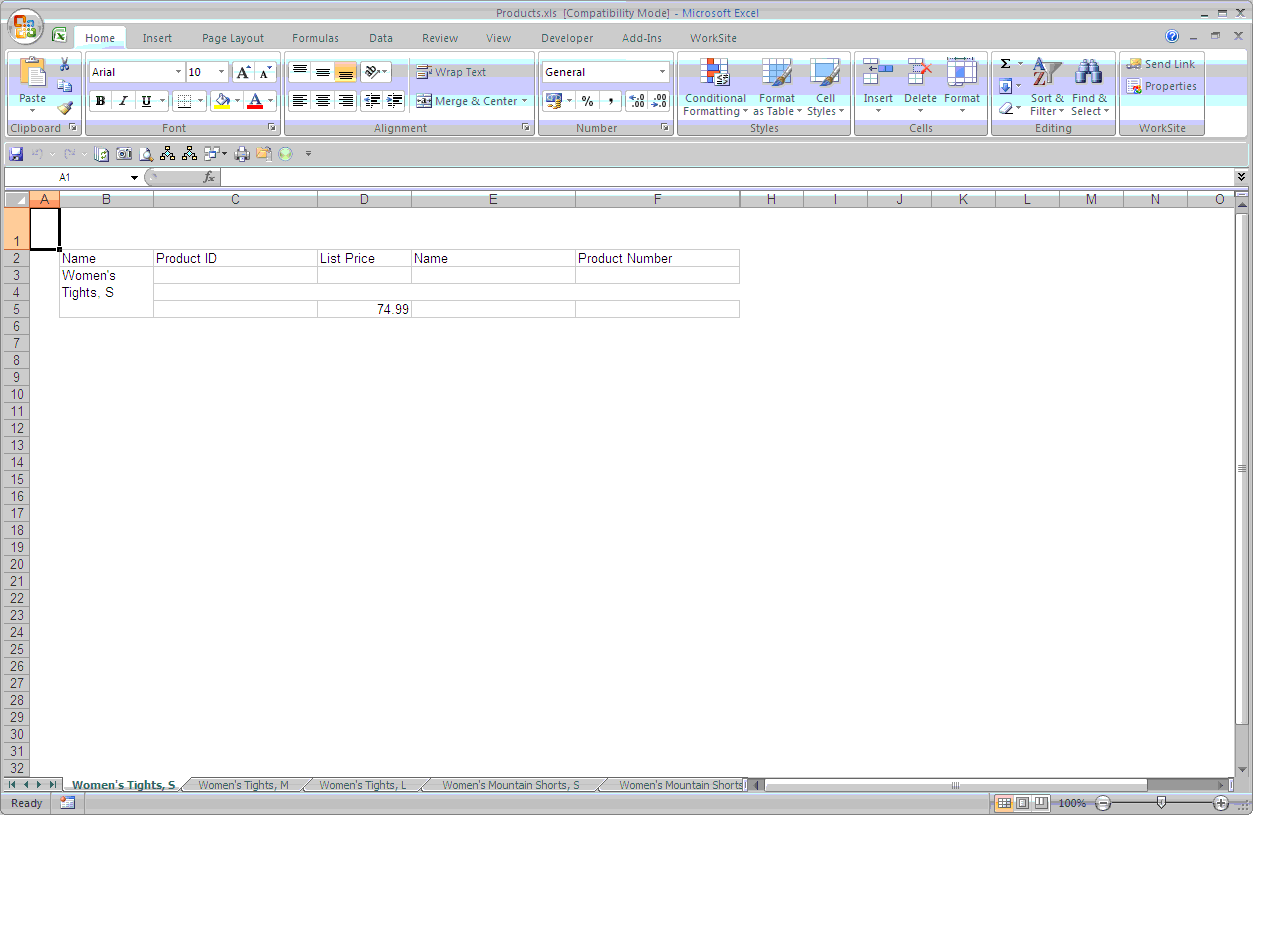
Exporting to Excel and renaming sheets in 2008 R2
In Reporting Services 2008 R2 Microsoft has added functionality to rename multiple sheets, so if your report is more than one page and you want to rename the worksheets this will work automatically out of the box.
You can either rename the sheets for a group, if each group has a page break between them or you can rename sheets if there is page break between objects.
To rename sheets in a table with groups all you have to do is select the group as shown below and then in the properties window (press F4 if the properties window is not shown) change the setting for pagename under the Group section to the value you want. This could be text or a field from your dataset.

The export to excel will rename the sheets with the group name.

You can either rename the sheets for a group, if each group has a page break between them or you can rename sheets if there is page break between objects.
To rename sheets in a table with groups all you have to do is select the group as shown below and then in the properties window (press F4 if the properties window is not shown) change the setting for pagename under the Group section to the value you want. This could be text or a field from your dataset.

The export to excel will rename the sheets with the group name.
Exporting to Excel and renaming sheets in 2005
In Reporting Services 2005 there was no functionality to rename sheets when your report was more than one page. You had to either use custom code to rename the sheets or use a macro.
We created a field in one of the cells in the report and then changed the font colour to white, then we created a macro to copy the value in the cell and rename the sheets. The macro is shown below:
Sub RenameSheets()
' Renames all the sheets based on the contents of the cell A1
' If the cell A1 is empty the sheet will be renamed and there is a limit of 31 characters if this is exceeded then only the first 31 are used
' If the following characters are used then an error will be returned:
' []?*/\:
Dim i As Integer
For i = 1 To Sheets.Count
If (Len(Worksheets(i).Range("A2").Value) < 32) Then
If (Len(Worksheets(i).Range("A2").Value) > 0) Then
Sheets(i).Name = Worksheets(i).Range("A2").Value
End If
Else
Sheets(i).Name = Left(Worksheets(i).Range("A2").Value, 31)
End If
Next
End Sub
We created a field in one of the cells in the report and then changed the font colour to white, then we created a macro to copy the value in the cell and rename the sheets. The macro is shown below:
Sub RenameSheets()
' Renames all the sheets based on the contents of the cell A1
' If the cell A1 is empty the sheet will be renamed and there is a limit of 31 characters if this is exceeded then only the first 31 are used
' If the following characters are used then an error will be returned:
' []?*/\:
Dim i As Integer
For i = 1 To Sheets.Count
If (Len(Worksheets(i).Range("A2").Value) < 32) Then
If (Len(Worksheets(i).Range("A2").Value) > 0) Then
Sheets(i).Name = Worksheets(i).Range("A2").Value
End If
Else
Sheets(i).Name = Left(Worksheets(i).Range("A2").Value, 31)
End If
Next
End Sub
Monday, 25 October 2010
New Line in a Text Box
In a text box field you can use the following code to force reporting services to start a next line.
'This the first line'+ VBCRLF +
'This is the second line'+ VBCRLF +
'This is the third'
'This the first line'+ VBCRLF +
'This is the second line'+ VBCRLF +
'This is the third'
Subscriptions SQL query
Due to the fact the reporting services allows you to query the tables you can easily write SQL which will allow you to return data from the reportserver database.
The script below specifically looks at the subscriptions table which can be created into a report with filters. It is quite handy when you have hundreds of subscriptions to easily find the one you are looking for.
Also as some developers will chose to create specific report subscriptions rather than use shared schedules it can be difficult to work out when they will be sent.
The way that the fields for the report specific times are stored is basically
1,2,4,8,16 etc for example for the day of the week field
1 is Sunday, 2 is Monday, 4 is Tuesday, 8 is Wednesday etc
All the fields are coded like this so it may be best to look at all the distinct values and then work out all the coding in your case statements.
The script will work for both reporting services 2005 and 2008 R2
Enjoy!!
select
case when parameters like '' then 'No Parameters' else
parameters end as Para,substring(path,2,50) as path_link,
recipients+' - '+cc+' - '+bcc as AllRecipients,
* from (
SELECT
month as month2,
case
when recurrencetype = 1 then 'One off'
when recurrencetype = 2 then 'Hour'
when recurrencetype = 4 then 'daily'
when recurrencetype = 5 then 'monthly'
when recurrencetype = 6 then 'month Week'
end as Typ,
case when daysofmonth = 1 then '1'
when daysofmonth = 2 then '2'
when daysofmonth = 4 then '3'
when daysofmonth = 8 then '4'
when daysofmonth = 16 then '5'
when daysofmonth = 32 then '6'
when daysofmonth = 64 then '7'
when daysofmonth = 128 then '8'
when daysofmonth = 256 then '9'
when daysofmonth = 512 then '10'
when daysofmonth = 1024 then '11'
when daysofmonth = 2048 then '12'
when daysofmonth = 4096 then '13'
when daysofmonth = 8192 then '14'
when daysofmonth = 16384 then '15'
when daysofmonth = 32768 then '16'
when daysofmonth = 65536 then '17'
when daysofmonth = 131072 then '18'
when daysofmonth = 262144 then '19'
when daysofmonth = 524288 then '20'
when daysofmonth = 1048576 then '21'
when daysofmonth = 2097152 then '22'
when daysofmonth = 4194304 then '23'
when daysofmonth = 8388608 then '24'
when daysofmonth = 16777216 then '25'
when daysofmonth = 33554432 then '26'
when daysofmonth = 67108864 then '27'
when daysofmonth = 134217728 then '28'
when daysofmonth = 268435456 then '29'
when daysofmonth = 536870912 then '30'
when daysofmonth = 1073741824 then '31'
when daysofmonth = 8193 then '1st and 14th day'
end as daysofmonth,
case
when Month = 4095 then 'All Months'
when MONTH = 585 then 'Jan,April,July,October'
when Month = 1 then 'Jan'
when Month = 2 then 'Feb'
when Month = 4 then 'Mar'
when Month = 8 then 'Apr'
when Month = 16 then 'May'
when Month = 32 then 'Jun'
when Month = 64 then 'Jul'
when Month = 128 then 'Aug'
when Month = 256 then 'Sep'
when Month = 512 then 'Oct'
when Month = 1024 then 'Nov'
when Month = 2048 then 'Dec' end as Month,
isnull(MinutesInterval,0) AS MinutesInterval,
case when isnull(MinutesInterval,0) <60 --right="" 0="" alue="" ame="" and="" arametervalue="" arametervalues="" as="" at="" bcc="" c.description="" c.name="" c.path="" case="" cc="" createdby="" days="" daysofweek="" ed="" else="" end="" extensionsettings="" hours="" hu="" left="" len="" ll="" minutesinterval="" modifiedby="" on-fri="" on="" parameters="" query="" recipients="" replace="" report_description="" report_name="" ri="" right="" s1.eventtype="" subs.description="" subs.lastruntime="" subs.laststatus="" subs.modifieddate="" subs.subscriptionid="" then="" to="" u.username="" u1.username="" ue="" un="" varchar="" wed="" when="" xml="">'SharedSchedule' then 'ReportSpecific' else s1.Name end as Schedule_Name,
s1.startdate,s1.nextruntime,s1.eventtype,subs.description as [Subscription Description]
FROM
ReportServer.dbo.Subscriptions subs with(nolock)
join catalog c on c.itemid = subs.report_oid
join users u on u.userid = subs.modifiedbyid
join users u1 on u1.userid = subs.ownerid
join reportschedule rs on rs.subscriptionid = subs.subscriptionid
join schedule s1 on s1.scheduleid = rs.scheduleid
) as D
The script below specifically looks at the subscriptions table which can be created into a report with filters. It is quite handy when you have hundreds of subscriptions to easily find the one you are looking for.
Also as some developers will chose to create specific report subscriptions rather than use shared schedules it can be difficult to work out when they will be sent.
The way that the fields for the report specific times are stored is basically
1,2,4,8,16 etc for example for the day of the week field
1 is Sunday, 2 is Monday, 4 is Tuesday, 8 is Wednesday etc
All the fields are coded like this so it may be best to look at all the distinct values and then work out all the coding in your case statements.
The script will work for both reporting services 2005 and 2008 R2
Enjoy!!
select
case when parameters like '' then 'No Parameters' else
parameters end as Para,substring(path,2,50) as path_link,
recipients+' - '+cc+' - '+bcc as AllRecipients,
* from (
SELECT
month as month2,
case
when recurrencetype = 1 then 'One off'
when recurrencetype = 2 then 'Hour'
when recurrencetype = 4 then 'daily'
when recurrencetype = 5 then 'monthly'
when recurrencetype = 6 then 'month Week'
end as Typ,
case when daysofmonth = 1 then '1'
when daysofmonth = 2 then '2'
when daysofmonth = 4 then '3'
when daysofmonth = 8 then '4'
when daysofmonth = 16 then '5'
when daysofmonth = 32 then '6'
when daysofmonth = 64 then '7'
when daysofmonth = 128 then '8'
when daysofmonth = 256 then '9'
when daysofmonth = 512 then '10'
when daysofmonth = 1024 then '11'
when daysofmonth = 2048 then '12'
when daysofmonth = 4096 then '13'
when daysofmonth = 8192 then '14'
when daysofmonth = 16384 then '15'
when daysofmonth = 32768 then '16'
when daysofmonth = 65536 then '17'
when daysofmonth = 131072 then '18'
when daysofmonth = 262144 then '19'
when daysofmonth = 524288 then '20'
when daysofmonth = 1048576 then '21'
when daysofmonth = 2097152 then '22'
when daysofmonth = 4194304 then '23'
when daysofmonth = 8388608 then '24'
when daysofmonth = 16777216 then '25'
when daysofmonth = 33554432 then '26'
when daysofmonth = 67108864 then '27'
when daysofmonth = 134217728 then '28'
when daysofmonth = 268435456 then '29'
when daysofmonth = 536870912 then '30'
when daysofmonth = 1073741824 then '31'
when daysofmonth = 8193 then '1st and 14th day'
end as daysofmonth,
case
when Month = 4095 then 'All Months'
when MONTH = 585 then 'Jan,April,July,October'
when Month = 1 then 'Jan'
when Month = 2 then 'Feb'
when Month = 4 then 'Mar'
when Month = 8 then 'Apr'
when Month = 16 then 'May'
when Month = 32 then 'Jun'
when Month = 64 then 'Jul'
when Month = 128 then 'Aug'
when Month = 256 then 'Sep'
when Month = 512 then 'Oct'
when Month = 1024 then 'Nov'
when Month = 2048 then 'Dec' end as Month,
isnull(MinutesInterval,0) AS MinutesInterval,
case when isnull(MinutesInterval,0) <60 --right="" 0="" alue="" ame="" and="" arametervalue="" arametervalues="" as="" at="" bcc="" c.description="" c.name="" c.path="" case="" cc="" createdby="" days="" daysofweek="" ed="" else="" end="" extensionsettings="" hours="" hu="" left="" len="" ll="" minutesinterval="" modifiedby="" on-fri="" on="" parameters="" query="" recipients="" replace="" report_description="" report_name="" ri="" right="" s1.eventtype="" subs.description="" subs.lastruntime="" subs.laststatus="" subs.modifieddate="" subs.subscriptionid="" then="" to="" u.username="" u1.username="" ue="" un="" varchar="" wed="" when="" xml="">'SharedSchedule' then 'ReportSpecific' else s1.Name end as Schedule_Name,
s1.startdate,s1.nextruntime,s1.eventtype,subs.description as [Subscription Description]
FROM
ReportServer.dbo.Subscriptions subs with(nolock)
join catalog c on c.itemid = subs.report_oid
join users u on u.userid = subs.modifiedbyid
join users u1 on u1.userid = subs.ownerid
join reportschedule rs on rs.subscriptionid = subs.subscriptionid
join schedule s1 on s1.scheduleid = rs.scheduleid
) as D
Thursday, 21 October 2010
Sending reports using SQL

Sometimes there may be a requirement to send a report using sql code or you may be fed up with having to change the time in report manager when you are develping a report.
1)The first step would be to create a shared schedule which is in the past
and give it a name eg My_schedule
see the screenshot for details.
In the reportserver database you will need to create a stored procedure which will allow you to do this but first you will need to create a Synonym to the schedule table. My understanding is that a synonym is normally used to save you time writing an object name if its on a different server, eg if you want to refer to a table called customers which was on a different server you would type
[servername].[databasename].dbo.customers
you can create a synoynm which will allow you to refer to this object without having to type the full name
2)create synonym dbo.mycutomers for [servername].[databasename].dbo.customers
So first create synonym for the schedule table on the reportserver database
create synonym dbo.runreportschedule for [servername].[databasename].dbo.schedule
Then create a store procedure which will fire the report schedule
3)
CREATE PROC [dbo].Runreportschedule(@EventName AS NVARCHAR(1000))
as
DECLARE @myScheduleID AS NVARCHAR(1000)
SELECT
@myScheduleID=s.ScheduleID
FROM
dbo.dbo.runreportschedule AS s
WHERE
NAME = @EventName
EXEC msdb..sp_start_job @job_name =@myScheduleID
You will need to give the system prcoedure sp_start_job permissions so that it can fire the report.
Everything is now set, All you need to do is create a subscription on report manager and then use the shared schedule you have created.

Then in query analyser execute the stored procedure
[dbo].Runreportschedule 'Myschedule'
This will then send the report immediately
T SQL Functions
T SQL Function which returns the date for the previous month, the date is required in 2 digits
select dbo.fnlastmonthdate(27)
result
2010-09-27 00:00:00
create FUNCTION [dbo].[fnlastmonthdate] (@day int)
returns smalldatetime
as
BEGIN
RETURN
--select
cast (
convert(char(4),case when datepart(mm,getdate())=12 then datepart(yy,getdate())-1 else datepart(yy,getdate()) end)
+'-'+
CASE WHEN len (case when datepart(mm,getdate())=12 then 1 else datepart(mm,getdate())-1 end) = 1 THEN
'0'+convert(char(1),case when datepart(mm,getdate())=12 then 1 else datepart(mm,getdate())-1 end) ELSE
convert(char(2),case when datepart(mm,getdate())=12 then 1 else datepart(mm,getdate())-1 end)
END
+
'-'+convert(char(2),@day)+ ' 00:00:00.000'
as smalldatetime)
END
GO
select dbo.fnlastmonthdate(27)
result
2010-09-27 00:00:00
create FUNCTION [dbo].[fnlastmonthdate] (@day int)
returns smalldatetime
as
BEGIN
RETURN
--select
cast (
convert(char(4),case when datepart(mm,getdate())=12 then datepart(yy,getdate())-1 else datepart(yy,getdate()) end)
+'-'+
CASE WHEN len (case when datepart(mm,getdate())=12 then 1 else datepart(mm,getdate())-1 end) = 1 THEN
'0'+convert(char(1),case when datepart(mm,getdate())=12 then 1 else datepart(mm,getdate())-1 end) ELSE
convert(char(2),case when datepart(mm,getdate())=12 then 1 else datepart(mm,getdate())-1 end)
END
+
'-'+convert(char(2),@day)+ ' 00:00:00.000'
as smalldatetime)
END
GO
Wednesday, 12 May 2010
SSRS Expressions
To Alternate colours for a group:
=iif(RunningValue(Fields!MYFIELD.Value,countdistinct,nothing) mod 2,"silver","white")
To Concatenate a String with a date value:
="Today is the day "+FormatDateTime(fields!MYDATE.Value)
To create a 'Page N of M' Expression:
="Page " & Globals.PageNumber & " of " & Globals.TotalPages
Concatenating a string with a currency value and removing the decimal places
="The current price of bread is : "+cstr(FormatCurrency(Fields!MYFIELD.Value,0))
Switch Expression Example works like a case statement in sql
=SWITCH(Fields!status_code.Value = "OPEN", "chartreuse",
fields!status_code.Value = "OPENA", "chartresuse",
fields!status_code.Value = "OPENC", "chartreuse",
fields!status_code.Value = "CLOSE","Gainsboro",
fields!status_code.Value = "ARCHI","Gainsboro",
TRUE,"yellow")
=iif(RunningValue(Fields!MYFIELD.Value,countdistinct,nothing) mod 2,"silver","white")
To Concatenate a String with a date value:
="Today is the day "+FormatDateTime(fields!MYDATE.Value)
To create a 'Page N of M' Expression:
="Page " & Globals.PageNumber & " of " & Globals.TotalPages
Concatenating a string with a currency value and removing the decimal places
="The current price of bread is : "+cstr(FormatCurrency(Fields!MYFIELD.Value,0))
Switch Expression Example works like a case statement in sql
=SWITCH(Fields!status_code.Value = "OPEN", "chartreuse",
fields!status_code.Value = "OPENA", "chartresuse",
fields!status_code.Value = "OPENC", "chartreuse",
fields!status_code.Value = "CLOSE","Gainsboro",
fields!status_code.Value = "ARCHI","Gainsboro",
TRUE,"yellow")
Subscribe to:
Posts (Atom)